Blogger Backup utility
Now you can use CodePlex's Blogger Backup Utility for backing up or restoring your blogger blog. The website: http://www.codeplex.com/bloggerbackup
I have to say it is a great tool~ enjoying.
Now you can use CodePlex's Blogger Backup Utility for backing up or restoring your blogger blog. The website: http://www.codeplex.com/bloggerbackup
I have to say it is a great tool~ enjoying.
Message from Adobe Download site .
Or use FTP: For Windows: ftp://ftp.adobe.com/pub/adobe/framemaker/win/8.x/FM_patcher_8_p273_E_F_D.exe For UNIX: ftp://ftp.adobe.com/pub/adobe/framemaker/unix/8.x/FrameMaker_Patcher_8_p272.tarThis download updates the English, French, and German language versions of Adobe® FrameMaker® 8p266 software to version 8p273. This patch is available to customers who have version 8p266 installed on their systems via Adobe Update Manager (AUM).
If you have version 8p236, please apply the 8p266 update first, and then apply version 8p273.
Once you launch FrameMaker 8p266, AUM will launch automatically and request that you apply the patch.
The FrameMaker 8p273 patch for Windows® includes corrections for the following issues:
• Shortcuts: Operations to change the Paragraph and Character tag in a document using Function keys F8 and F9
• Incorrect hyphenation and indexing
• Hyperlinks inoperable from one PDF file to another if the files are opened via the web
• Incorrect conversion of certain Unicode characters of Symbol/Dingbats/WebDings fonts when an XML file is opened in FrameMaker
• Fixes related to control characters, import RTF, and so onFor a more detailed list of resolved and known issues, see the ReadMe file installed with the update in the FrameMaker program directory.
File InformationProduct FrameMaker
Version 8.0.2
Platform Windows
File Name FM_patcher_8_p273_E_F_D.exe
File Size 30.8MB
Proceed to Download
Customize the toolbar(s) of Adobe FrameMaker 7.1 without paid software/plugins (e.g. MicroType's ToolbarExpress).
Adobe FrameMaker的工具栏上能找到的工具太少,这一直是个问题。以前据说能用MicroType的ToolbarExpress来设置,但后来这个东东变成收费的了。找不到免费解决方案,又不爽了它简陋的工具栏这么多年,考虑再三,决定自己亲手去修改它。
FrameMaker包含QuickAccess和Format两个工具栏,其修改方式大同小异,主要涉及安装目录中的customui.cfg, fmtoolbr.ini, fmcustom.dll文件。修改customui.cfg,可以添加自定义的菜单和命令,修改fmcustom.dll,可以添加自己设计的按钮(要知道,FrameMaker中并不是每个操作都内置了按钮的),修改fmtoolbr.ini,可以将特定的命令或菜单添加到工具栏上,并组织它们的排布。
具体方法不赘述了,效果如下所示(单击查看原图):

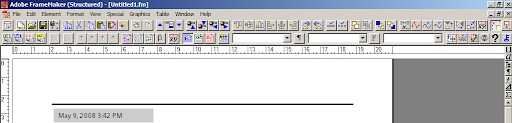
在QuickAccess栏添加了Save As, Copy Special, Paste Special, Add file to book, update book等操作,并将文字和表格操作工具合并为一页,将图形操作工具合并为一页。
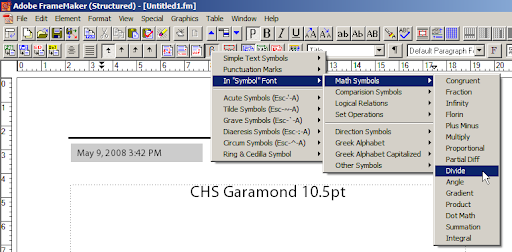
在Formatting栏,添加了Import File/Object/Format/Element Definition按钮,添加了Add cross reference/footnote/Variable等按钮,添加了一个菜单专门用来插入各种特殊符号(这个菜单如下图所示),添加了Object property按钮,添加了切换Body/Master/Reference Page视图的按钮,添加Apply Master pages按钮,添加Paragraph/Character Designer按钮,最后添加了文档中的Combined font, Color definitions, PDF Settings, View Options, General Preferences等对话框的启动按钮,以及切换文档锁定状态的按钮。
插入特殊符号的菜单如下图所示(单击查看原图):
现在我有了一个很高效率的工具栏,并且可以根据自己的需要随时调整它的内容和布局,看起来很不错的说:)
FM8在一次性替换所有match时,如果条目过多,则会耗费巨量内存直至崩溃。在Adobe Forums提问后得到回复,解决方法已有,在ini文件中设置Preference一节中加入“ClearHistorySpecial=On”。
原帖在此:http://www.adobeforums.com/webx/?13@912.dPfqiv8AaaB@.3c05a417/0Michael Mueller-Hillebrand - 2:15am Dec 26, 07 PST (#1 of 1)
Lefantome,
although only mentioned in the read-me file, the problem with many find-and-change tasks (introduced with FrameMaker 7.2's multiple undo feature) has been dealt with in 8.0p266. A little background: What many users love: Every change operation is written to the undo buffer! What was overseen: some processes require find and change on thousands of occasions and with each single change stored in the undo buffer, it is a) rather slow and b) consumes RAM.
It happens only to a minority of customers and has been "solved" using an maker.ini entry (as described in the read me file as issue #1555297). Just add
ClearHistorySpecial=On
to the section [Preferences] and it should work.
- Michael
Message FROM Adobe BLOG
可以通过FrameMaker menu > "Help" > "Updates...".来升级,如果需要单独下载升级包,则可以在http://swupdl.adobe.com/updates/50/framemaker/framemaker8_0_1.exe。文件大小:155,187KB。
莫名其妙地发现FrameMaker有些文件无法删除和修改一些自定义的色彩(View-Color-Definitions)。网上查到Adobe给出的办法,简而言之是将二进制的*.fm文件另存为ASCII格式的*.mif(FrameMaker Interchange Format)文件,即可删除颜色定义,然后另存回*.fm文件即可。
但按照这个办法去做,却并未奏效:在*.mif文件中,不能删除的依旧不能删除。确认不是自己操作和理解的问题,想到*.mif文件是ASCII格式,干脆用文本编辑器试试看。文档中,那些无法删除修改的颜色的定义下赫然有一行标记了颜色保留的属性(ColorIsReserved):
<Color <ColorTag `Purple'> <ColorCyan 75.999451> <ColorMagenta 100.000000> <ColorYellow 66.999817> <ColorBlack 0.000000> <ColorLibraryFamilyName `Crayon'> <ColorLibraryInkName `Purple'> ColorAttribute ColorIsReserved > # end of Color |
今天终于下了决心从8.0迁移回7.1,主要原因有以下几个:
问题:显示“error occurred”。
解决办法:在“Save as PDF”的时候,选择“Generate tagged PDF”——不管你是否确实想要tag。
combined font模式下,英文文字的smart quote无法生效,特殊字符无法输入。后者的解决办法是把字体设置成纯英文字体,然后输入,然后再改回来-,-
前面说过FrameMaker中如何设置文本shading,目前的解决办法,是这样的: 比如,我们需要使得Heading1背后有一行的shading,无法直接为它添加这个属性,那么,我们添加一个叫做Heading1_Pre的样式,在reference page中设置一具备shading属性的frame,将其设置为Heading1_Pre的Frame after Paraf,将Heading1_Pre的后续段落样式设置为Heading1,字体设置成很小的号比如1pt,颜色设置成无色,设置这两个Pgf必须出现在同一页面(即设置Heading1_Pre必须与后续段落处于同一页)。 然后是关键内容:设置Heading1_Pre的段后距离(Space below Pgf)为负值,必要的时候,也设置Heading1的Space before Pgf为负值,根据需要,调整这两个的数值,以及前面设置的frame的高度(以适应Heading1的行高)。 简而言之,因为段落间距可以设置为负数,所以可以使用Heading1_Pre这个辅助样式的frame添加shading。 已知问题:如果启用了side heading的话,Heading1_Pre和Heading1都设置成Across All Columns and Side heads,则方法失效。原因不明。 不便之处:frame的高度固定,因此仅适用于Heading1的行数固定的情况。
安装替换后无法双击打开*.fm文件,只能先启动软件再通过菜单打开。 进步:格式工具栏上增加了字体、字号显示等一些小东西,以及上一页、下一页按钮,多了一个History Panel,可以多步撤销操作(赞这个)。内部增加的新功能没多少,至少没有我想要的文字底纹和边框以及中文竖排。安装大小居然比7.1还小了一些,不知道是7.1打了补丁的缘故还是因为7.2不用装Distiller。 还有一个新功能,说可以把特定的master page与特定的Paragraph Format关联起来,这样在有特定PF的页面会自动使用指定的MP。
FrameMaker中可以设置Paragraph Style的属性,包含设置Space before Paragraph,但当所在段落(比如标题)位于文本框(Text Frame)顶部时,这个space会被忽略掉,段落在Frame的顶部开始,没有空白空间。这样在某些时候就会使得标题很难看;倘若配合Master Page的话,会牵扯到更多因素,比如导致调整文章内容的时候需要重新调整Master Page的应用(据说FrameMaker 7.2可以设置特定Master Page与特定Paragraph Style关联了,可以让这个问题容易解决一些,但我还在用7.1)。 解决办法:到Reference Page中添加一个新的空白Frame,然后设置为那个对应Paragraph的"Frame before Paragraph"。也就是说,用这个Frame来代替段前空白空间,就不会出现这个空白被忽略的情况了。 另外还有个问题,FrameMaker中的Smart Quotes功能,虽然能够在输入的时候自动匹配引号,但如果将大片纯文本粘贴过来的时候就无法匹配了。且貌似没有给出解决方法来。现在所知道的方法还只能依靠MS Word来解决,在自动更正选项中,AutoFormat As You Type下的"Replace as you type: straight quotes with smart quotes"选上,然后将所有"替换为",所有'替换为',就可以完成匹配了。然后save as RTF或者doc,再导入到FrameMaker中。 下一个问题:如何在Framemaker中设置特定段落的底纹,据说这个是有偏方可以解决的。 下下个问题:如何将Unstructured Framemaker Document转换为Structured.
2007年4月4日,google推出谷歌中文拼音输入法:
 输入法主页:http://tools.google.com/pinyin/
输入法下载:http://dl.google.com/pinyin/GooglePinyinInstaller.exe
输入法的提示栏以及设置选项如下:
输入法主页:http://tools.google.com/pinyin/
输入法下载:http://dl.google.com/pinyin/GooglePinyinInstaller.exe
输入法的提示栏以及设置选项如下:
 各项功能设置在Google的介绍中已经比较详细了,这里说一说今天试用发现的亮点和不足:
亮点:
★速度不错,不假死,输入词句的正确率也不错;
★输入比较准确,繁体字输入也比紫光之类要好一些;
★支持笔画输入法,按u激活,hspdnz分别是横竖撇点捺折,和手机的笔画输入类似,这个对于输入不知道拼音的字很有用:
各项功能设置在Google的介绍中已经比较详细了,这里说一说今天试用发现的亮点和不足:
亮点:
★速度不错,不假死,输入词句的正确率也不错;
★输入比较准确,繁体字输入也比紫光之类要好一些;
★支持笔画输入法,按u激活,hspdnz分别是横竖撇点捺折,和手机的笔画输入类似,这个对于输入不知道拼音的字很有用:
 ★支持英文输入,按v激活;
★用户可以把自己的个性化词库(包括自己的词和输入习惯)同步到Google账户上去,这样在任何能够链接互联网的地方都可以获取“自己的”输入法;
★嵌入了Google搜索(当然这个也是广告策略了,但其实还是满方便)。
不足:
●界面还是有些不够精致;
●输入法的可定制性不够好,很多比如提示字的字体大小都无法调整;
●软键盘切换有些麻烦,如果在软键盘上右键即可出选单就方便多;
●字库要是能再大些就更好了。
综上,还是个值得用一用的输入法。建议试试。
★支持英文输入,按v激活;
★用户可以把自己的个性化词库(包括自己的词和输入习惯)同步到Google账户上去,这样在任何能够链接互联网的地方都可以获取“自己的”输入法;
★嵌入了Google搜索(当然这个也是广告策略了,但其实还是满方便)。
不足:
●界面还是有些不够精致;
●输入法的可定制性不够好,很多比如提示字的字体大小都无法调整;
●软键盘切换有些麻烦,如果在软键盘上右键即可出选单就方便多;
●字库要是能再大些就更好了。
综上,还是个值得用一用的输入法。建议试试。
mplayer-KK是将linux下鼎鼎大名的mplayer配置编译移植到Windows下的绿色视频播放软件,支持几乎所有的视频格式以及字幕之类的外挂,对系统资源要求也较少,而该有的功能基本都有,适合广大劳动人民的电脑使用。用了两年多了,才发现有那么几个功能今天才发现。写点东西来和大家share。
以下为MPlayer-KK版默认控制,需要修改或查看所有控制命令请查看/mplayer/input.ini
播放器下载地址(MPlayer-SVN-21532-KK):
http://rapidshare.com/files/6473695/MPlayer-SVN-21532-KK.7z.html
http://www.newsmth.net/att.php?p.99.994889.578.7z
基本播放
→ 前进10秒
← 后退10秒
↑ 前进60秒
↓ 后退60秒
PageUP 前进10分钟
PageDown 后退10分钟
Enter 全屏开关
Space 暂停开关
Esc 退出
q 退出
音量
9 降低音量
0 增大音量
/ 降低音量
* 增大音量
a 切换声道:若有多种语言音轨,在多音轨间切换;
否则,在左右声道与立体声间切换;
字幕
o 切换屏幕显示键盘控制(比如音量)和时间的格式
v 切换是否显示字幕
j 在不同语言的字幕之间切换
z 字幕推迟显示0.1秒
x 字幕提前显示0.1秒
{ 字幕提前显示1秒
} 字幕提前显示10秒
r 字幕位置向上1%
t 字幕位置向下1%
画面
1 对比度减
2 对比度加
3 亮度减
4 亮度加
7 饱和度减,到最后就是黑白了
8 饱和度加
d 切换是否降低祯数,显卡跟不上去的时候使用,以避免影音不同步
s 截屏,截取的图片(png格式)存放在视频所在文件夹下
其他非常用控制
< 暂停状态下,后退一祯
> 暂停状态下,前进一祯
F7 将播放速度减慢0.25倍速
F8 将播放速度加快0.25倍速
F6 将播放速度重设为1.0倍速
鼠标控制
单击 暂停开关
双击 全屏切换
右键单击 切换前端显示-总是|播放时|总不
按滚轮 切换OSD(同o)
滚动滚轮 调节音量
另外,我觉得kk.ini里面的gui_thread还是设置成0舒服些..
我一直夸Opera 又乖又快,用习惯了以后真的会有很大的忠诚度,比如地址栏、搜索栏都有Paste and Go的快捷键(Ctrl-B),比如最早提出的Mouse Gesture(现在FireFox也有插件了,但俨然比Opera晚了很多,而且还不是标准支持),可以设置多个数据链接到http服务器(可能这也是它快的原因——FlashGet自然比IE下载东西快),浏览器左侧的Panel也十分方便,很早就有bookmark和浏览历史的搜索功能,查询email功能,以及新版Opera中支持的还算不错的Feeds。若说有问题,那就是少数网页和Opera不兼容,因为网页不标准,于是有功能无法在Opera下实现,这不怪Opera。user mode和author mode也很有意思。在用SecureCRT的时候,我会发现很多问题需要改进,可以提出很多建议;然而在用Opera的时候,基本上说不出什么话来——需要的功能都有了。
从几年前用试用版到后来Opera完全免费,一直是忠实用户,所以推荐。
与时下的FireFox比,Opera自带功能对我来说够用了,不够的话可以去添加Opera Widgets;而FireFox则需要大量DIY才能实现同样的功能(当然,丰富度也很大),而且不管是否承认,FX的各个版本一直存在程度不等的内存回收问题——关了网页还不释放内存,我一共才512M,被它这样吃可受不了。
http://sharptoolbox.com/categories/regular-expressions
I'm now using the Regulator, but it seems that the software doesn't support Chinese File Input very well...Of course, you can input Chinese in the "input" text box of the program.
英文WindowsXP安装后中文文件夹、文本显示为乱码,一般是由于在安装过程中没有恰当配置区域和语言选项造成的。只要在系统启动进入后重新设置一下区域和语言选项即可,具体步骤如下: After installing WindowsXP English Version, you find all the Chinese characters in text file and Folders named with Chinese character cannot display correctly. Generally this is due to improper settings of Regional and Language Options. After you start and enter the operationg system, the following operations can help you get everything all right: 1. Enter the "Regional and Language Options".(进入区域和语言设置)
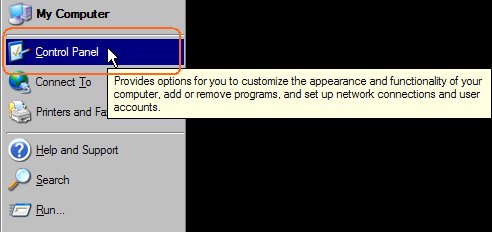
 2. Settings


 ;
;